Switching off Redtail is easier than the fear of it. Here's an honest look at how the migration works, what drives the timeline, and what to ask before you commit.

Nobody switches CRMs for fun. If you're reading this, something finally tipped. Maybe it was the tenth time you couldn't find a note, the workflow that never quite worked, or the realization that your CRM hasn't meaningfully changed while everything else in your tech stack has.
The good news: switching off Redtail is dramatically easier than it used to be. The fear of migration is usually worse than the migration. Here's an honest look at how the process works, what affects the timeline, and what to ask any vendor you're evaluating.
Why advisors switch off Redtail
Redtail has been around for over two decades, and plenty of firms have run on it for most of that time. But the complaints we hear from switching firms are remarkably consistent.
The data model is contact-based, not household-based. Advisors serve families, but Redtail organizes people as individual contacts, so householding is a manual chore: linking records, deduplicating, and keeping families aligned as things change.
Automation is limited. Redtail's workflows are essentially task checklists. They don't trigger emails, react to events, or do any of the work themselves. Everything still depends on someone remembering to do it.
And there's no AI. No meeting notetaker, no drafting, no way to ask a client a question and get an answer. In 2026, that gap compounds every single week.
If none of that bothers you, staying put is a fine decision. If it does, here's what switching actually looks like.
How the migration actually works
A Redtail-to-Slant migration has five steps. The software parts are fast; the parts that take time are the decisions only your firm can make.
- Export your Redtail database. In Redtail, go to Manage Your Account › Database Backups › Request Database Backup. If your database is large — a decade-old account with 10,000+ contacts, for example — the backup can take a while to generate.
- Upload it to Slant. In Slant, go to Settings › Data Import › New Import, choose Redtail, and upload the backup file.
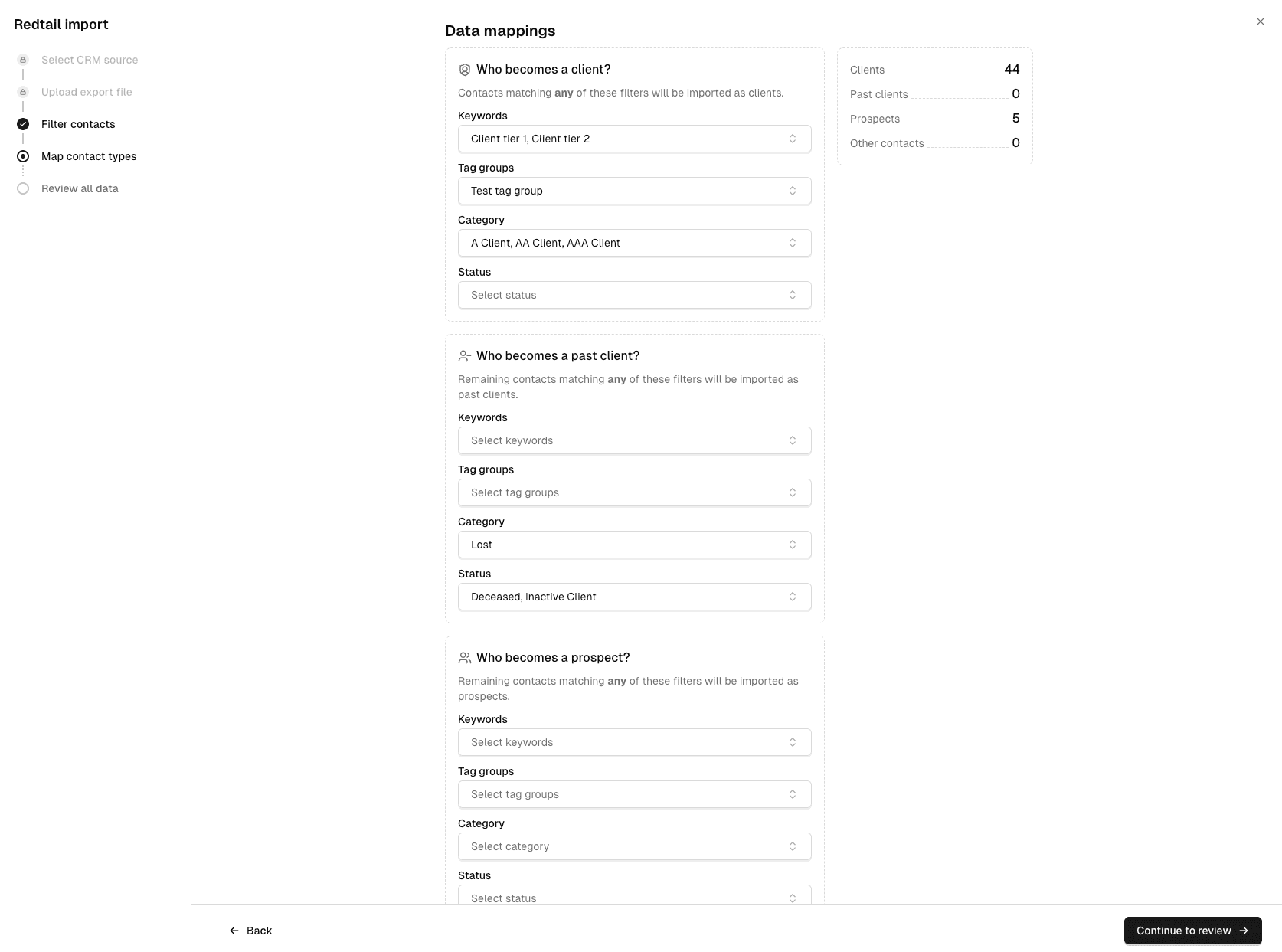
- Filter who comes over. You don't have to bring everyone. Most firms with older databases don't. Decades of Redtail data accumulate former clients, one-time referrals, fund managers, and contacts nobody remembers adding. The import lets you filter by status, category, and tag, so you decide who makes the trip.
- Map contacts to the right buckets. This is where Redtail contacts automatically become Slant households. You set the rules for who lands as a Client, Prospect, Past Client, or Other Contact, usually based on the statuses or tags you already use. Anything can be reclassified later, but getting it right up front saves cleanup.
- Review and import. Before anything is final, you get a full list of who's coming over. Spot-check it, deselect the one-offs, then run the import. It processes in the background while you do other things.
How long does it take, honestly?
Depending on your setup, the import itself can take as little as a few minutes. But total migration time depends on your firm's complexity, and it's worth being honest about what drives it.
A solo advisor with a clean, recent database can be done in an afternoon. A firm with a 20-year-old Redtail account, thousands of contacts, and years of inconsistent tagging will spend most of its migration time on decisions, not software: who comes over, how they're classified, and what data is worth keeping. That's not a tooling problem; no CRM can decide for you which of your thousands of contacts still matter.
Two timing realities worth knowing. First, some accounts may need manual linking after import. Accounts without a matching tax ID (such as certain trusts) can't be auto-matched to households. Second, if you plan to re-import later, know that the Redtail file acts as the source of truth: a re-import will override edits you've made in Slant. The practical rule is simple — don't start editing records until you're confident everything you want has come over. If you only missed a handful of contacts, adding them manually is faster than re-importing.
Most teams tell us they feel fully moved in within about a week — integrations connected, daily rhythm shifted, old system no longer open in a tab. And every Slant migration is guided by a real human on our team, not a help article.
How to prep for a smooth migration
Three things you can do before you ever touch the import screen:
- Find out who your Redtail admin is. Only an admin can request the database backup. You'd be surprised how many firms don't know, and it's a five-minute fix that shouldn't happen mid-migration call.
- Tag your clients in Redtail before exporting. Add a keyword like "Slant client" to every active client. It gives you one reliable filter at import time instead of reverse-engineering years of inconsistent statuses.
- Request the full backup, filter later. Don't try to pre-trim your database in Redtail. Export everything and use the import filters to narrow it down — it's easier, and you can't accidentally leave anyone behind.
What life looks like after
The point of switching isn't just a cleaner database; it's what the new system does that the old one couldn't.
In Slant, every meeting is automatically recorded, transcribed, and turned into tasks. If a task needs an email, it's prewritten and includes your calendar availability. Every client and prospect record is enriched with data you never typed in. Chat answers questions across your entire book — things like "who haven't I met with this year?" — in seconds. Annual reviews track automatically based on the cadence you set for each client tier.
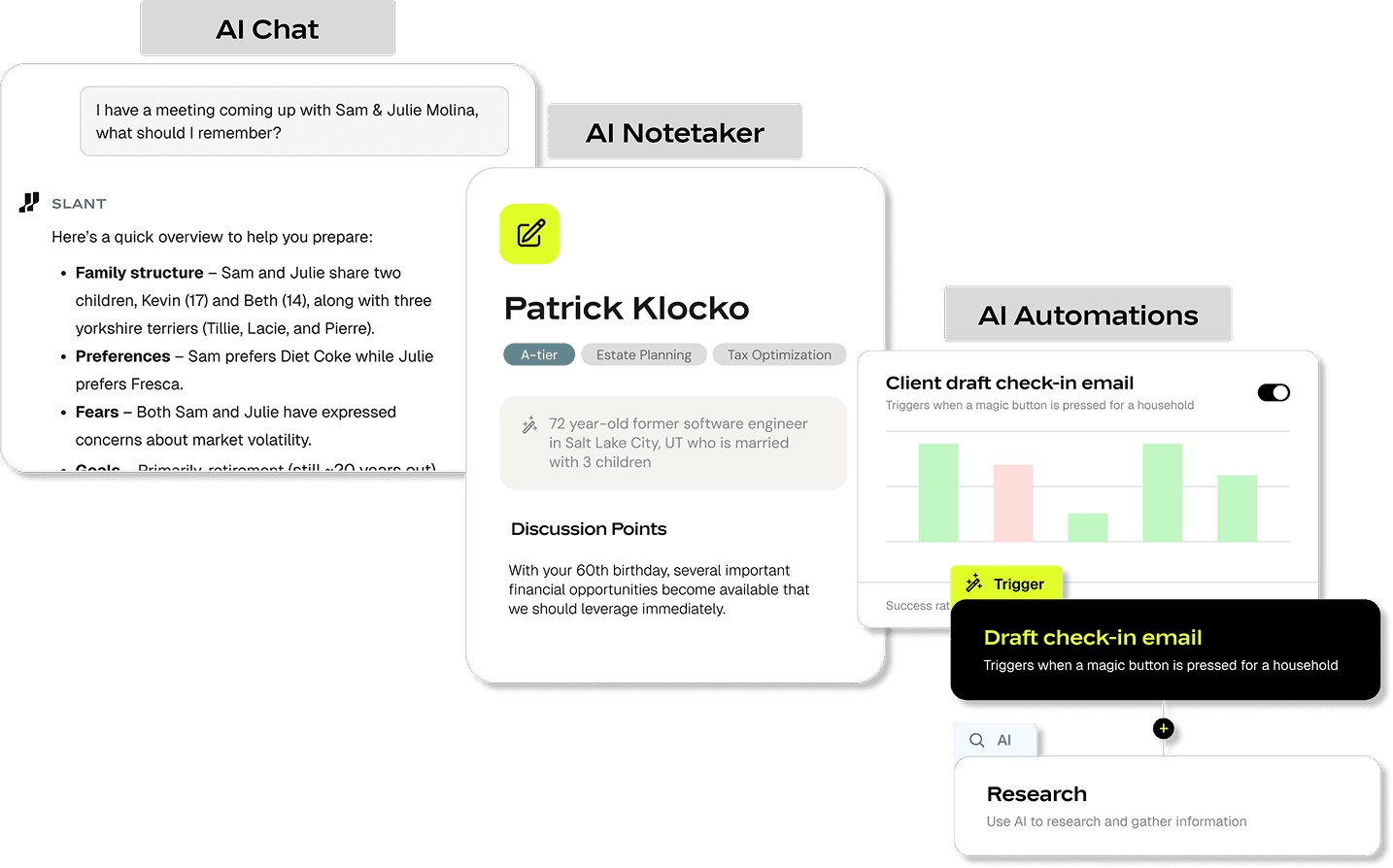
That's the gap between a system that records what happened and a system that moves work forward. Redtail was built for the first job. Switching to Slant is about the second one.
The short version
The import mechanics are fast; the timeline depends on your firm. Clean database and clear client list? An afternoon. Decades of accumulated contacts? Budget real time for the decisions, then let the software do the rest. Prep by finding your admin, tagging your clients, and exporting everything.
Ready to upgrade your CRM? Book a demo, and we'll walk through the import together.

Written by
Noah Hankin, CPA, CFP®
Noah leads financial planning at Slant, where he shapes how the CRM supports planning and AI-assisted advisor workflows. A CPA and CFP® professional, he came to Slant from Foundry Financial, where he built tax-focused retirement plans and supported advisors on plan development, monitoring, and tax preparation. He studied personal financial planning, accounting, and operations management at the University of Colorado Boulder.
Keep reading
All migrations postsThe 3 C's of AI prompting for financial advisors
Noah Hankin, CPA, CFP® · Sep 24 · 7 min
Financial advisor workflows: 10 templates you can copy
Noah Hankin, CPA, CFP® · Sep 14 · 10 min
What RIA Leaders Actually Look for in a CRM
Noah Hankin, CPA, CFP® · Jul 17 · 4 min